
Clients, QA testers and your team click on the live site and say what needs to change. BugRadar attaches the screenshot, the page and the device, and turns every comment into a task your team can finish.
- Pro free for 12 months
- No card required
- Script tag or Chrome extension
Roasted on Tuesday. At your door by Friday.
Small-batch coffee from a roastery in the hills, delivered fresh every week.
Shop the beansSarah LeeClient · Homepage
Can the headline fit on two lines on my phone?
Built for
- Digital agencies
- Freelancers
- QA teams
- Product and marketing teams
An email with a vague subject line. A screenshot in a chat. A PDF full of arrows. Notes from a call. Before anyone can fix a thing, someone has to work out what the client actually meant.
- EmailRe: Re: Fwd: homepage feedback (final v3)The button thing is still there on my phone?
- ChatSent you a screenshotIt’s the page with the team photos, not sure which one, sorry
- PDFHomepage_feedback_v2.pdf14 comments on 3 pages, drawn over an old version
- Call notesThursday check-inMenu “feels off”. Ask which device she was on.
- Which page?Links get lost somewhere in the thread.
- Which screen?Phone, tablet or laptop is rarely mentioned.
- Is it done yet?Nobody has one list of what is fixed and what is not.
Three steps, and the email thread is no longer where your project lives.
Add BugRadar to the site
Paste one script tag into your staging or live site, or open it with the Chrome extension. Then invite your client and teammates to the project.
Roasted on Tuesday. At your door by Friday.
Small-batch coffee from a roastery in the hills, delivered fresh every week.
Shop the beansindex.html
Leave feedbackSarah Lee joined as Client
Whether the feedback comes from a client, a tester or the marketing lead, it arrives the same way: on the page, with the details attached.
Digital agencies
Run client reviews without the email chain.
A separate project for every client · Clients only see the projects you add them to · Staging and live addresses in one project
BugRadar for agenciesFreelancers
Look organised from the very first review.
Free plan with five active projects · Clients comment on the site, not in your inbox · One list of what is left before sign-off
Working on your ownQA teams
Bug reports that make sense the first time.
Screenshot, page, browser and screen size on every report · Severity and priority set when the report is filed · Console errors and failed requests, if you switch them on
Product and marketing teams
Review every launch together before it goes live.
Feedback on staging pages before launch day · Screen recordings for flows and animations · A live board everyone can follow
No follow-up emails asking which page or which phone. The details are captured the moment the comment is sent.
- 01Annotated screenshotDrawn on by the person who saw the problem.
- 02The exact pageThe page address is saved, so nobody has to ask.
- 03Browser and screen sizeKnow whether it was a phone, a tablet or a wide monitor.
- 04The spot they pickedThe element they clicked is saved with the comment.
- 05Screen recordingUp to two minutes, for anything easier to show than describe.
- 06Technical details, if you want themRecent console errors and failed requests for developers. A setting on each project.
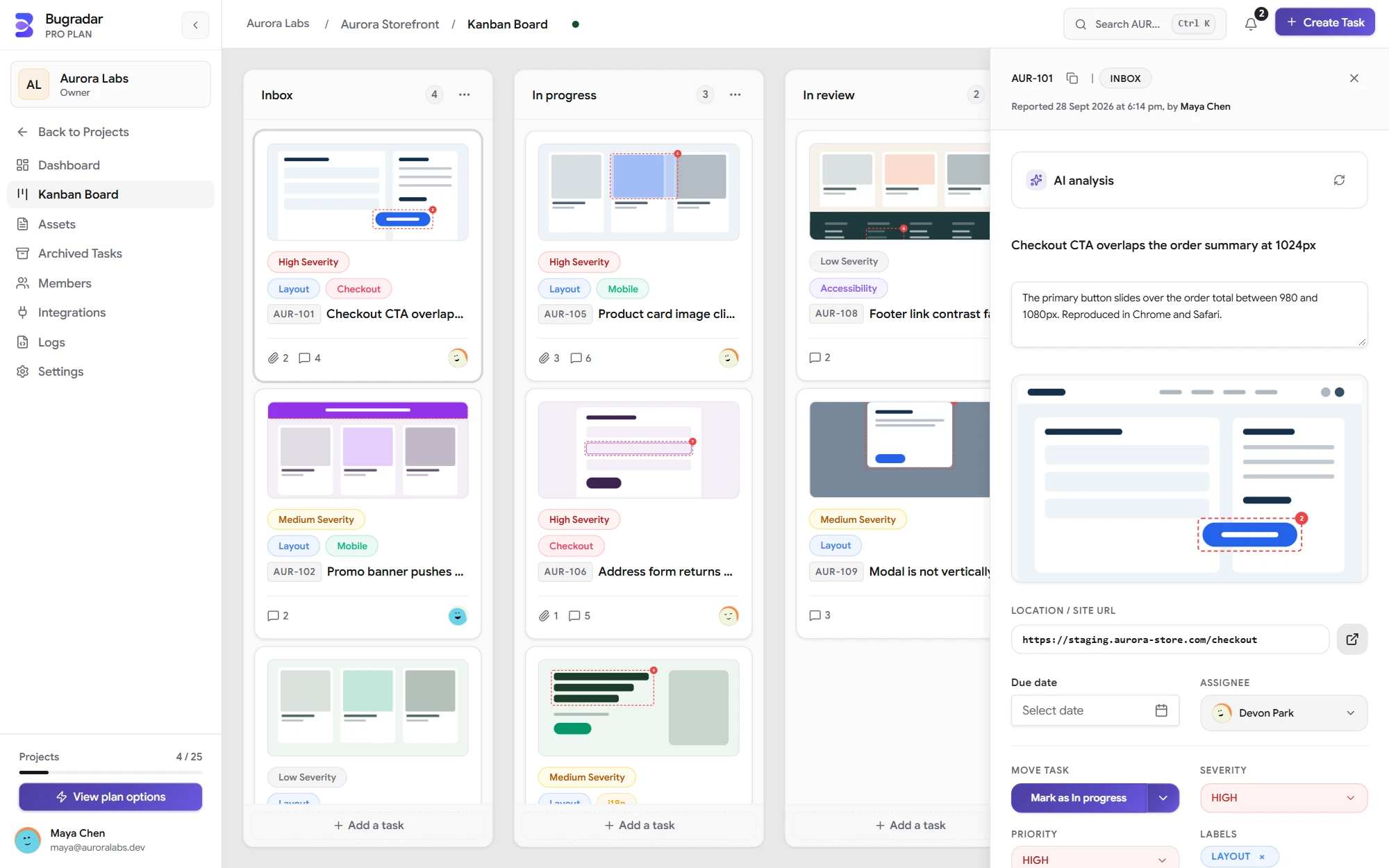
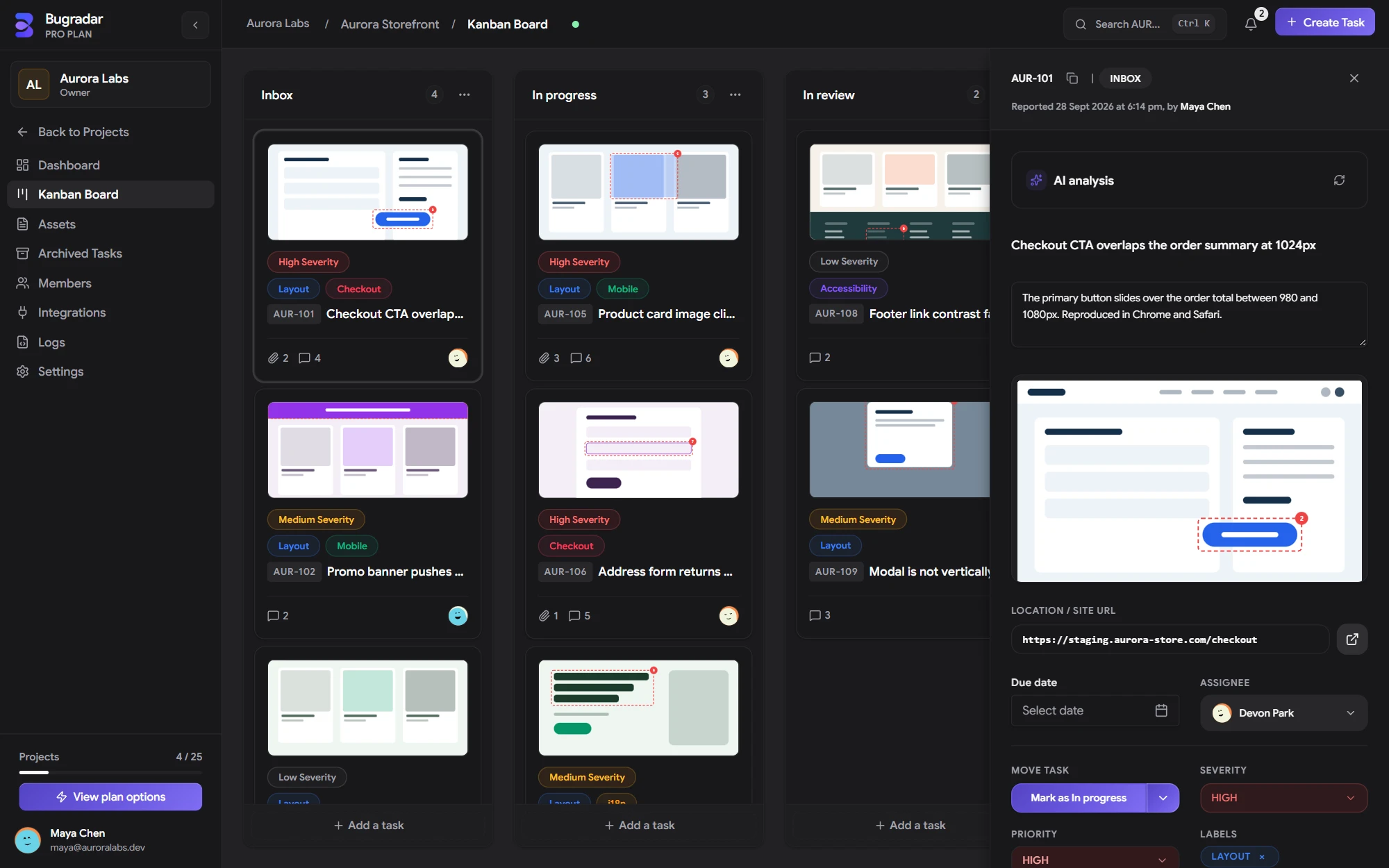
A task in BugRadar, shown with sample project data.
Clients describe what they see, not what is wrong. BugRadar AI reads the comment, the screenshot and the page details, then suggests a clear title, a severity and first steps for your developer.
Included with Pro. Premium doubles the limits. See plans
What the client wrote
Sarah LeeClient
menu looks weird on my phone??
BugRadar AI
- Title
- Severity
- Next steps
A sample suggestion. Real suggestions depend on what each report contains.
- Runs when you askClick Analyze with AI on a task. It only works on projects where it is switched on.
- Reads the whole reportThe comment, the screenshot, the page, the browser and screen size, and any technical details.
- Sensitive text removedTokens, keys and email addresses are redacted before anything is sent.
- You approve every changeAccept or skip each suggestion. Nothing changes on its own.
Clients see their own project and nothing else. Your team gets the access their job needs. Every workspace starts with these five roles.
Premium adds custom roles and advanced permission controls, for teams with their own way of working.
| Admin | Project Manager | Developer | QA Tester | Client | |
|---|---|---|---|---|---|
| Leave feedback and comment | |||||
| Edit and move any task | |||||
| Create projects | |||||
| Add people to projects | |||||
| See every project in the workspace | |||||
| Manage billing |
Add it to the site so clients have nothing to install, or bring it with you in the browser.
- Website script
- Paste one script tag into your staging or live site. A feedback button appears on the page, and the people you invite sign in once to use it.
- Chrome extension
- Collect feedback without touching the site’s code. Turn BugRadar on for an approved website from the browser toolbar.
- Phone and tablet layouts
- Every report records the browser and the exact screen size, so a layout problem on a phone arrives labelled as one.
- GitHub and GitLabOn the roadmap
- Link feedback to issues and pull requests, so every fix can be traced back to the comment that asked for it.
Your first year of Pro is free. No card required · No automatic renewal
Free
For trying BugRadar with a small team
$0/forever
Free forever
Start free- Up to 5 members
- Up to 5 active projects
- 2 GB storage
- Real-time issue boards
- Visual capture and page diagnostics
- File attachments and comments
- Project webhooks
- AI Task Assist not included
Pro
1 year freeFor growing product and delivery teams
$0/first year
Normally $29/mo after first year · No card required
Choose Pro- Up to 15 members
- Up to 25 active projects
- 25 GB storage
- Up to 2 owned organizations
- Everything in Free
- Higher member and project limits
- AI Task Assist analysis
- Shared project assets
- Configurable workflows
Premium
For agencies and teams operating at scale
$99/month
Sold through our sales team
Contact sales- Unlimited members
- Unlimited active projects
- 100 GB storage
- Up to 5 owned organizations
- Everything in Pro
- Double the AI Task Assist limits
- Custom organization roles
- Advanced permission controls
- Expanded storage capacity
Enterprise
Talk to salesFor teams that need a tailored commercial agreement
How clients take part, what they can see, and how the plans work.
All questionsYes. Invite them to the project, and they sign in once from the website. From then on every comment is tied to a verified person, not an anonymous visitor. Clients join as members of your workspace, so they count toward your plan’s member limit.
Set up a project, invite your client, and collect feedback on the live site today.
Pro free for 12 months · No card required · No automatic renewal